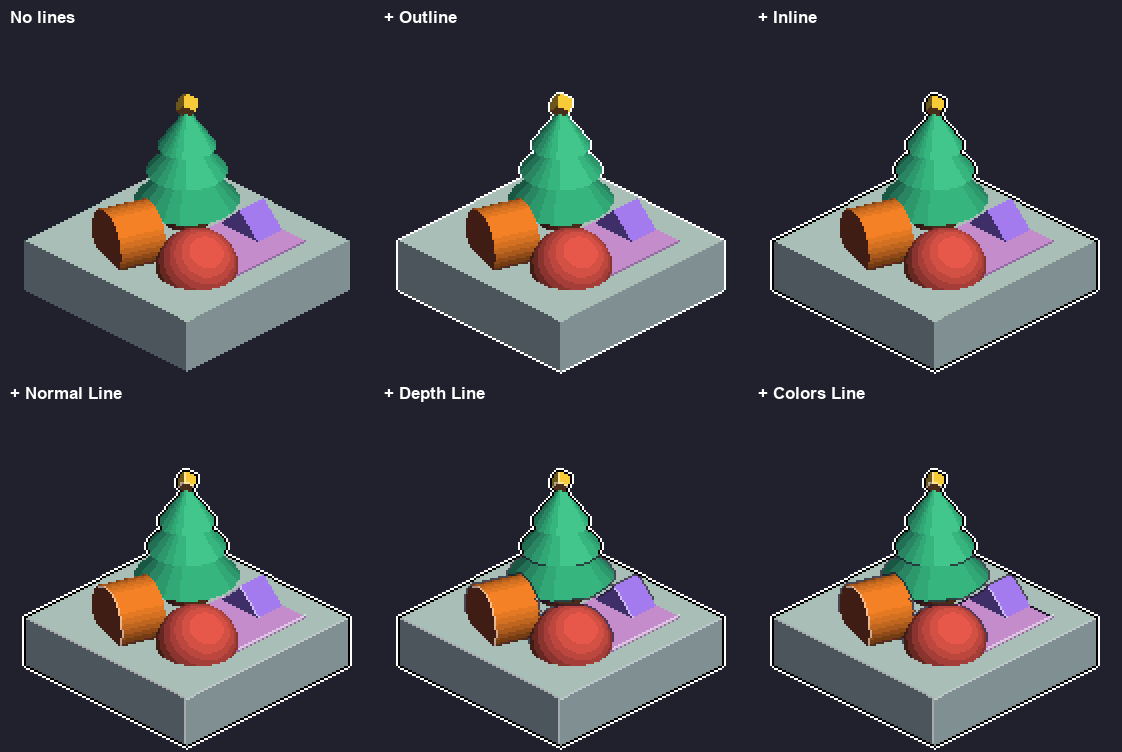
- Outline: a line around the sprite’s silhouette, in the empty pixels outside it.
- Inline: a line on the sprite’s own edge pixels, so the footprint stays the same.
- Colors Line: a line where two colors you pick touch.
- Normal Line: interior lines where the surface bends sharply, such as the edges of a box.
- Depth Line: interior lines where one surface stands in front of another, such as an object on a table or an arm in front of the body.
Outline
Leave at least Size pixels of empty space around the source in the cell, or the outline is cut off at the cell edge. Pixelate Pro warns you when that happens.
Inline
Size, Fill, and Color / Darken work like the Outline’s. The Color’s alpha (the bar under the swatch) blends the line with the pixel under it, so a half-transparent black darkens the edge instead of covering it.Colors Line
Normal Line
Normal Line finds creases in the captured normals. It needs a 3D model or prefab source.Depth Line
Depth Line finds places where one surface is in front of another, using a depth layer Pixelate Pro captures for it. It needs a 3D model or prefab source.
Where two surfaces touch (feet on the floor, a mug on a table) the depth gap fades to zero, so no line is drawn there and objects don’t look like they float.
When Normal Line and Depth Line are both on, they never double up into a 2-pixel line: where one object stands in front of another, a Normal Line is kept only on the side the Depth Line takes (the surface behind), and there the Depth Line is blended over it, as in PixelOver (black 39% under black 59% gives about 75% black). An opaque Depth Line covers it. A part only 1 or 2 pixels wide, such as a thin post or the front of a rug, keeps its own pixels: its lines go on the surfaces around it instead of covering it. Lines never clump into 2x2 blocks where they meet.
Options
Tips
- The Golden Hour, Moonlit, Ember and Sorbet sample profiles use a 1 px Darkest Palette Color outline with rounded corners.
- A look close to PixelOver’s on a small isometric scene: a white Outline, a black Inline, Normal Line with white and black lines at 39%, and Depth Line in black at 59%, all Indexed. The palette includes white and shades for the semi-transparent lines, so Indexed keeps them visible. Like PixelOver’s palette it needs no pure black, so the black Inline takes the palette’s darkest color. The Depth Line Threshold is 10%. With an Auto palette, add those colors (or use a Custom palette) when your line colors are not in the sprite.
- Coming from PixelOver: the settings map one to one. Normal Line’s Threshold uses the same percentage. Depth Line’s Threshold is measured differently: start from 5% for characters, or around 10% for scenes like PixelOver’s (its 30% on that scene).
- Turning on Normal Line in Unlit, or Depth Line in any mode, captures that layer once. Every other Lines change updates the Preview without recapturing.
- Darkest Palette Color needs an enabled Color Palette. Without one the line is black.
- Lines runs after Dithering and before Palette Swap, so Palette Swap also recolors palette-colored lines.