> ## Documentation Index
> Fetch the complete documentation index at: https://docs.pixelatestudio.tomblack.ca/llms.txt
> Use this file to discover all available pages before exploring further.
# Lighting
> Shade sprites with fixed lights, preview normals, bake light into sprites, and export normal maps for URP 2D lights.
Lighting captures the surface direction (normals) of your source and uses it in two ways:
* **Normal maps** for your game's 2D lights. Export writes one per sprite sheet and links it automatically.
* **Fixed lights** in the Preview, and optionally baked into the exported sprites for hand-shaded looks.
Lighting also unlocks the **Lit** and **Normal** draw modes in the [Preview](/guides/preview).
## Settings
| Setting | What it does |
| - | - |
| **Normal Map Steps** | Rounds the normal map to this many levels per axis, so 2D lights shade in flat facets like hand-shaded pixel art. Lower values give fewer, larger facets; 1 keeps smooth normals. Default 5. |
| **Palette Affects Lighting** | Shown when the profile has a Color Palette. On: the palette snaps the lit result. Off: the palette snaps the base color before lighting. |
### Global Light
An ambient light that brightens every pixel evenly.
| Setting | What it does |
| - | - |
| **Enabled** | Turns the global light on or off. |
| **Color** | Color of the light. |
| **Intensity** | Strength of the light. 0 turns it off. Default 0.5. |
### Directional Light
A light from one direction that gives the sprite a lit side and a shaded side.
| Setting | What it does |
| - | - |
| **Enabled**, **Color**, **Intensity** | As for the global light. |
| **Lighting Steps** | Number of brightness bands on the lit side. 1 gives a single hard lit/shadow split; higher values give smoother shading. |
| **Light Threshold** | Where the light turns into shadow. Lower values give more lit pixels. Default 0.35. |
| **Backlight Strength** | Adds a stylized rim when the light moves behind the sprite. |
| **Backlight Width (px)** | How far the rim spreads inward from the silhouette, 1 to 10 pixels. |
| **Direction** | Light angles in degrees. X is vertical, Y is horizontal. |
Turn on **Show Directional Light Gizmo** in the Preview's gear menu to see the light direction while you tune it. It shows in Lit mode.
### Export
| Setting | What it does |
| - | - |
| **Export Lit Sprites** | Off (default): exported sprites keep their unlit colors, and the lights above only affect the Lit preview. On: the lights are baked into the exported sprites. |
| **Export Normal Map** | Also export a normal map for each sprite sheet, in a `Normals` folder, linked to the sprites as their `_NormalMap` secondary texture. On by default. |
| **Normal Map Suffix** | Added to each normal map's file name, for example `Run_Right_N.png`. Default `_N`. |
## Use the normal maps with URP 2D lights
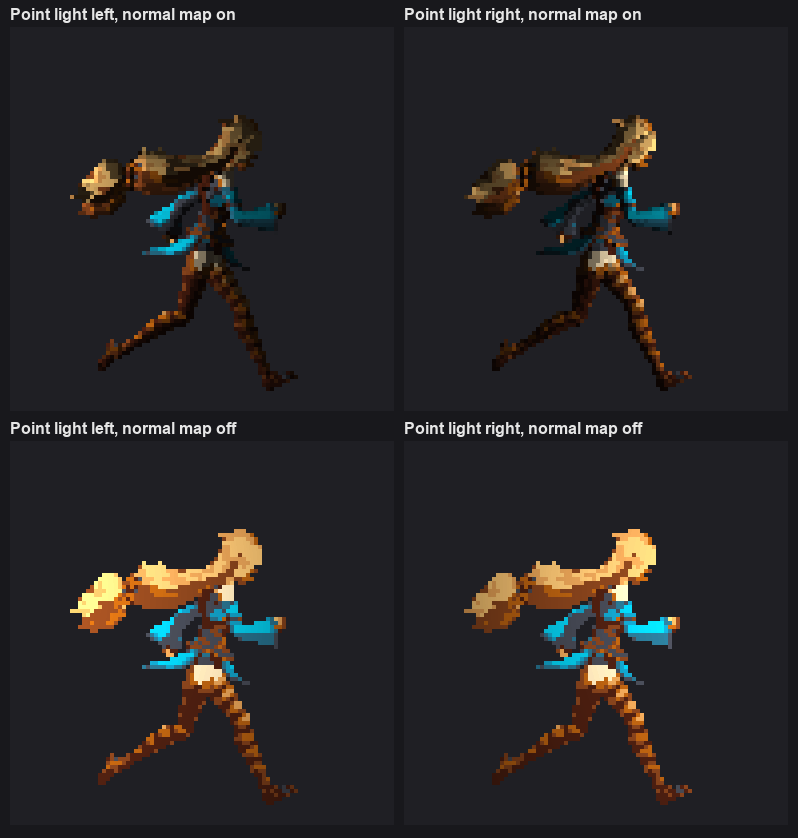 Each sprite sheet gets its normal map as the `_NormalMap` secondary texture. You don't need to change any import settings.
Use a SpriteRenderer with the URP 2D Renderer's default lit sprite material (`Sprite-Lit-Default`).
On each Light 2D, under **Normal Maps**, set **Quality** to Fast or Accurate.
Choose between the two approaches:
* **Dynamic lighting in your game:** keep **Export Lit Sprites** off and use the normal maps with 2D lights.
* **A fixed, hand-shaded look:** turn **Export Lit Sprites** on. The sprites carry their shading, and you can still export normal maps.
This documentation is built and hosted on [Mintlify](https://mintlify.com), a developer documentation platform.
Each sprite sheet gets its normal map as the `_NormalMap` secondary texture. You don't need to change any import settings.
Use a SpriteRenderer with the URP 2D Renderer's default lit sprite material (`Sprite-Lit-Default`).
On each Light 2D, under **Normal Maps**, set **Quality** to Fast or Accurate.
Choose between the two approaches:
* **Dynamic lighting in your game:** keep **Export Lit Sprites** off and use the normal maps with 2D lights.
* **A fixed, hand-shaded look:** turn **Export Lit Sprites** on. The sprites carry their shading, and you can still export normal maps.
This documentation is built and hosted on [Mintlify](https://mintlify.com), a developer documentation platform.