> ## Documentation Index
> Fetch the complete documentation index at: https://docs.pixelatestudio.tomblack.ca/llms.txt
> Use this file to discover all available pages before exploring further.
# Dithering
> Blend between neighboring palette colors with ordered dither patterns.
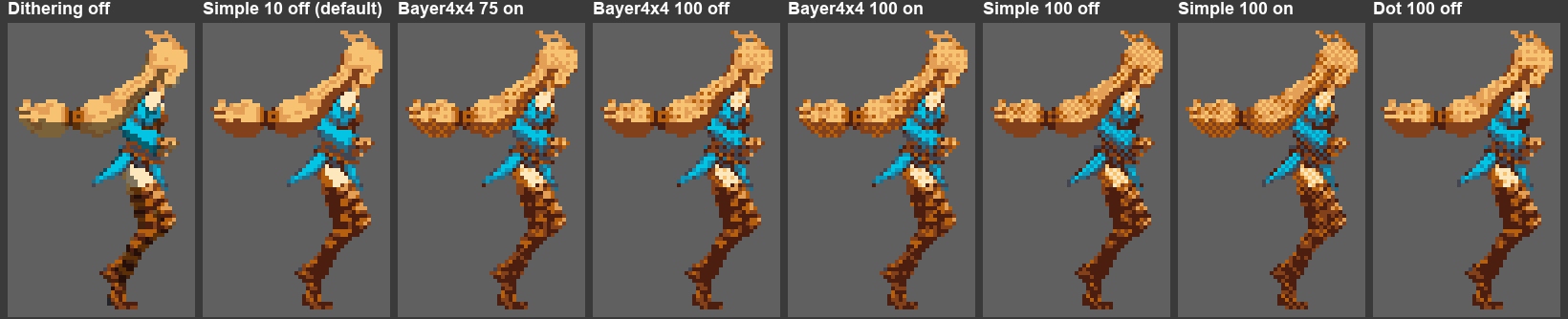
Dithering mixes each pixel's palette color with its nearest lighter or darker palette neighbor in a regular pattern. It smooths gradients and adds texture when a palette has few colors.
Dithering needs an enabled [Color Palette](/effects/color-palette) in the same profile.
 ## Settings
| Setting | What it does |
| - | - |
| **Pattern** | The ordered pattern that decides which pixels switch to the neighboring color: **Simple** (checker), **Bayer 2x2**, **Bayer 4x4**, **Bayer 8x8**, **Dot**, **Horizontal Line**, **Vertical Line**, or **Custom**. Pick it from the dropdown; the strip under it previews the pattern on a black-to-white ramp at the current Amount and Center. |
| **Custom Pattern** | Shown when Pattern is Custom: a Sprite or Texture2D mask, ranked by brightness. |
| **Amount (%)** | Width of the blend between palette colors. 0 is plain palette snapping; 100 applies the full pattern. Default 50. |
| **Center** | Off: the darker color is drawn over the lighter side of each transition, and dark areas stay solid. On: the transition spreads evenly in both directions. |
Areas whose color exactly matches a palette color stay solid up to 50%. Above 50%, Bayer and Dot patterns fade them in, reaching a 25% pattern at 100. Simple and Line patterns have no 25% level, so they pattern those areas only at exactly 100, at 50%.
## Tips
* Start with **Bayer 4x4** around 50 to 75% for smooth shading, or **Simple** for a classic checker.
* For a custom pattern, use a small PNG inside `Assets`. If it can't be read, enable **Read/Write** in its import settings.
This documentation is built and hosted on [Mintlify](https://mintlify.com), a developer documentation platform.
## Settings
| Setting | What it does |
| - | - |
| **Pattern** | The ordered pattern that decides which pixels switch to the neighboring color: **Simple** (checker), **Bayer 2x2**, **Bayer 4x4**, **Bayer 8x8**, **Dot**, **Horizontal Line**, **Vertical Line**, or **Custom**. Pick it from the dropdown; the strip under it previews the pattern on a black-to-white ramp at the current Amount and Center. |
| **Custom Pattern** | Shown when Pattern is Custom: a Sprite or Texture2D mask, ranked by brightness. |
| **Amount (%)** | Width of the blend between palette colors. 0 is plain palette snapping; 100 applies the full pattern. Default 50. |
| **Center** | Off: the darker color is drawn over the lighter side of each transition, and dark areas stay solid. On: the transition spreads evenly in both directions. |
Areas whose color exactly matches a palette color stay solid up to 50%. Above 50%, Bayer and Dot patterns fade them in, reaching a 25% pattern at 100. Simple and Line patterns have no 25% level, so they pattern those areas only at exactly 100, at 50%.
## Tips
* Start with **Bayer 4x4** around 50 to 75% for smooth shading, or **Simple** for a classic checker.
* For a custom pattern, use a small PNG inside `Assets`. If it can't be read, enable **Read/Write** in its import settings.
This documentation is built and hosted on [Mintlify](https://mintlify.com), a developer documentation platform.